
 Sloane Rafferty
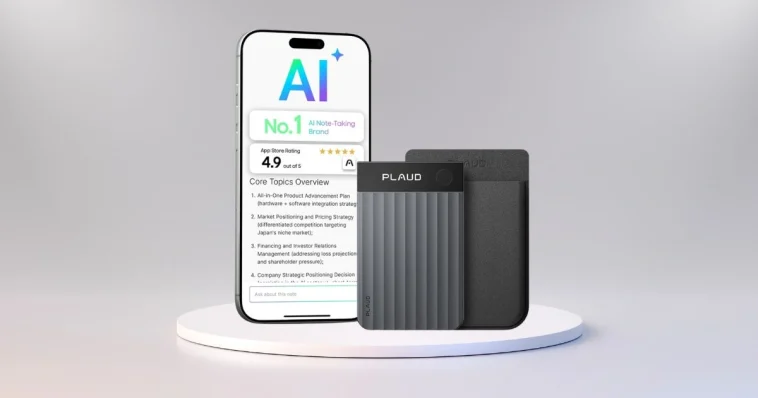
Finding a reliable way to capture conversations, meetings, and ideas without losing detail has become essential for many professionals, students, and content creators. Traditional audio recording devices can store spoken words, but they do not always make those recordings easy to access, understand, or organize. The Plaud Note Pro AI Voice Recorder changes how audio information is preserved by turning spoken content into structured, searchable, and actionable text and summaries. This significantly improves how critical information is revisited, organized, and reused in a wide range of settings.
By leveraging advanced artificial intelligence and intuitive hardware, the Plaud Note Pro simplifies recording and note management so users can focus on their conversations, work, or creative processes instead of manual writing. This article will explore the verified features, real‑world applications, benefits, and practical comparisons of the Plaud Note Pro, illustrating how it enhances productivity and efficiency for its users.
What Is the Plaud Note Pro AI Voice Recorder?
The Plaud Note Pro AI Voice Recorder is a compact, AI‑powered recording device that captures high‑quality audio and transforms it into organized, searchable text. Whereas traditional audio recorders save unstructured audio files that must be manually reviewed and transcribed, the Plaud Note Pro uses its built‑in artificial intelligence to create clear transcripts and intelligent summaries that help users understand the most important parts of any conversation or discussion.
This device is particularly useful for professionals who attend frequent meetings, students who record lectures, and content creators who conduct interviews. With its small, ultra‑slim form factor, the Plaud Note Pro can be carried in a pocket, attached to a phone, or placed on a table during a session. Its InstantView display provides at‑a‑glance status updates, including recording length, mode, and battery life.
View this post on Instagram
Key Features and Capabilities
The features that follow are confirmed by official Plaud specifications and supported by reputable sources, ensuring that all details are accurate and reliable.
Intelligent Audio Capture
One of the core strengths of the Plaud Note Pro is its ability to capture clear and detailed audio from conversations, presentations, and environments where multiple voices may be present. The system includes:
- Dual‑mode recording for calls and in‑person conversations, automatically switching between recording modes as needed.
- A studio‑grade microphone array with four MEMS and one VPU microphone, designed to capture voices clearly at distances of up to approximately 16.4 feet.
- Advanced noise reduction and environmental filtering help isolate speech from background noise.
- Extended battery life with up to 30 hours of recording time in standard mode and up to 50 hours in Endurance mode, allowing extended sessions without frequent recharging.
- A compact, lightweight design that makes it easy to carry and use anywhere.
These features collectively make the Plaud Note Pro suitable for larger spaces and longer recordings while maintaining audio quality and usability.
AI Transcription and Language Support
The Plaud Note Pro differentiates itself from basic audio recorders through its advanced AI transcription capabilities. The device works closely with the Plaud App to convert audio into text that is easy to read and search.
- Supports transcription in 112 languages, enabling global users to transcribe recordings into readable text regardless of language.
- Speaker labeling and diarization help distinguish between different voices in the same conversation.
- Custom vocabulary support improves accuracy for specific industries or technical terms.
- Readable and searchable transcripts, formatted automatically for clarity and ease of use.
This comprehensive transcription capability ensures that users can quickly locate specific parts of a conversation or extract key ideas without manually scanning entire audio files.
Summaries and Insight Tools
After converting audio to text, the Plaud Note Pro’s integration with Plaud Intelligence goes further by creating summaries and insights from recordings.
- Smart summaries highlight important points and themes from recorded conversations, enabling users to review the key ideas quickly.
- Multidimensional summaries generate multiple perspectives from a single conversation, such as decisions, action items, or feedback summaries tailored to different roles or purposes.
- Integration with the Plaud App and Plaud Desktop allows access to recorded audio, transcripts, and insights across devices.
These AI‑generated summaries turn what could be long, dense recordings into easily digestible summaries that are useful in professional documentation, review, and planning.
Multimodal Inputs
In addition to capturing voice, the Plaud Note Pro supports multimodal data, meaning users can enrich their recordings with other types of contextual information:
- Typed text notes can be added via the Plaud App to enhance the depth of recordings.
- Images can be captured and linked to specific moments in recordings, which provides visual context for more complete summaries.
- Highlight markers can be applied during recording to mark key moments that the AI should prioritize in summaries.
These multimodal inputs help create richer contextual data around recordings, improving the accuracy and relevance of transcripts and AI‑generated insights.
View this post on Instagram
Practical Uses in Everyday Scenarios
The versatility of the Plaud Note Pro makes it valuable in many real‑world situations where accurate audio capture and organized notes matter. Here are some of the key daily uses of the device:
Business Meetings
In professional environments, missing details can cause misunderstandings, delayed projects, or repeated follow‑ups. The Plaud Note Pro can help teams:
- Record full discussions clearly, capturing all contributors.
- Provide AI‑generated summaries that highlight decisions and action items.
- Enable easy sharing of transcripts and notes with colleagues through the Plaud App.
By transforming meetings into organized records, users can reduce the time spent rewriting notes and improve accountability.
Academic Lectures
Students can benefit significantly from automated transcription and summarization tools, especially in settings where taking complete notes by hand is difficult:
- The device transcribes lectures in multiple languages, making it suitable for international and multilingual study environments.
- Summaries and searchable text help students identify important concepts faster.
- Easy review and study preparation becomes possible because students can revisit key points without listening to entire recordings.
This capability makes the Plaud Note Pro a helpful study companion for detailed subjects and fast‑paced classes.
Interviews and Content Creation
For journalists, podcasters, and content creators, accurate transcription of interviews and discussions is essential:
- The device produces organized transcripts that are easy to edit and repurpose for articles, scripts, and outlines.
- Users can combine audio, text, and images to enrich content.
- Time saved by automated transcription and summarization means creators can focus more on creative output and less on manual editing.
These workflows help reduce the workload associated with content production while increasing accuracy and flexibility.
Personal Voice Memos
Even outside of structured professional or academic use, the Plaud Note Pro is useful for everyday tasks like personal reminders, brainstorming, or idea capture:
- Spoken ideas are converted into searchable notes that can be accessed over time.
- Users can organize recordings by topic or date within the app.
- Important ideas can be highlighted for quick reference later.
This broad applicability makes the device versatile for personal and spontaneous capture needs.
Pros and Cons
Pros
- AI transcription in 112 languages with speaker labels enhances global usability.
- High‑quality audio capture with multiple microphones that reach up to approximately 16.4 feet.
- Smart summaries streamline review and understanding.
- Long battery life supports both standard (30 hours) and endurance (50 hours) recording.
- Compact design with an InstantView display for status information.
- Multimodal inputs via the Plaud App enrich note‑taking beyond simple audio capture.
Cons
- Audio quality may vary in certain environments, particularly where voices are distant or background noise is high. (User reports suggest this may happen in some real‑world cases.)
- Some advanced features depend on connectivity with the Plaud app for full access and usage.
- Transcription quotas are limited on the free starter tier, requiring subscription upgrades for extensive usage.
Tips to Get the Best Results
To maximize the performance and accuracy of the Plaud Note Pro:
- Place the device centrally in group settings to capture all voices clearly.
- Use highlight markers during recording to help the AI focus on key moments.
- Keep the Plaud app and device firmware updated for the latest features and enhancements.
- In noisier environments, shorter recording sessions may improve transcription accuracy.
- Take advantage of the Ask Plaud feature to quickly query recordings for specific information.
Comparison With Other Plaud Devices
Plaud Note
The original Plaud Note is an AI recorder that handles basic transcription and note capture. While it performs well for casual use, it lacks the advanced summary generation, multimodal inputs, and extended recording capabilities of the Pro version.
Plaud NotePin
The Plaud NotePin is a wearable AI recorder designed for quick, hands‑free recording. It is highly portable but offers less advanced transcription and summary tools compared to the Plaud Note Pro.
Plaud Note Pro
The Plaud Note Pro remains the most sophisticated device in the Plaud lineup, combining powerful audio capture, advanced AI transcription, smart summaries, and multimodal inputs into a single portable tool. It is designed for users who need professional‑level performance and reliable insights from recordings.
Frequently Asked Questions
What is the Plaud Note Pro AI Voice Recorder?
A compact AI recorder that captures high‑quality audio and turns it into structured, searchable notes.
How does AI transcription work?
It transcribes speech into text, detects speakers, and organizes content into readable formats using Plaud Intelligence and app integration.
What are the battery life and storage options?
The Plaud Note Pro can record up to 30 hours in standard mode and up to 50 hours in Endurance mode. It provides 64 GB of internal storage.
Can the Plaud Note Pro connect to other devices?
Yes. Through the Plaud App, users can sync recordings, export transcripts, and manage notes on phones, tablets, and computers.
Who should use the Plaud Note Pro?
Professionals, students, journalists, podcasters, researchers, and anyone who needs reliable AI transcription and organized note‑taking.
The Ultimate Tool for Organized Audio Notes
The Plaud Note Pro AI Voice Recorder transforms the process of capturing spoken content into a productive, organized workflow that adapts to a variety of user needs. With verified features such as advanced AI transcription, speaker labeling, extended battery life, multimodal inputs, and smart summaries, it provides a complete solution for capturing, understanding, and reusing important audio information.
While no device is perfect, the Plaud Note Pro’s combination of hardware and software capabilities makes it a highly valuable tool for anyone who wants to efficiently manage spoken knowledge across professional, academic, and personal contexts.